SUMMON
Your GPU. Your model. Your API.
v1.2.0 · what's new: API keys, HTTPS tunnel, uncensored models
One command turns your NVIDIA GPU into a private AI with an OpenAI-compatible API. Summon picks the model, weights and context that fit your card, verifies the download, keeps the port private and tests tool calling before it hands you the URL. No cloud. No API bill. Nobody else's servers.
01 Install
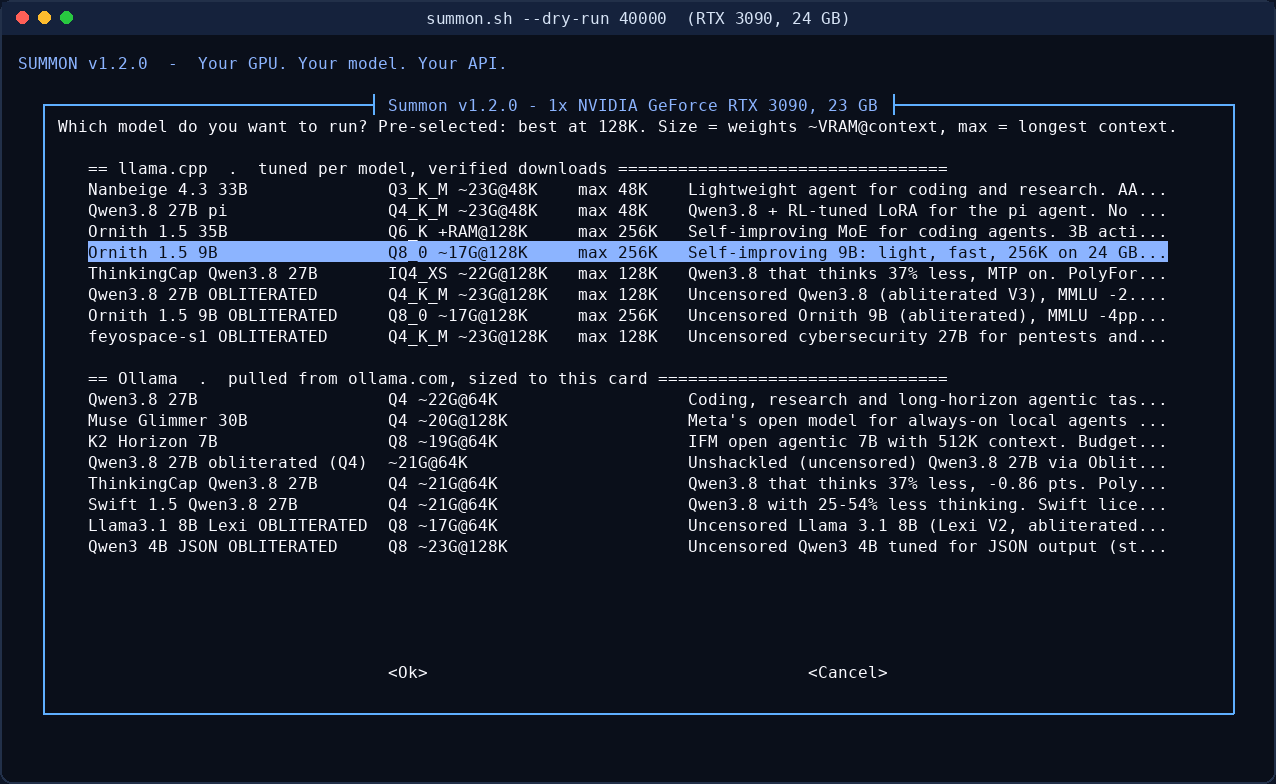
No GPU on this machine? Preview any card: SUMMON_GPU="RTX 3090:24576" ./summon.sh --dry-run.
Prefer to read first? Good habit: summon.sh ·
install.sh · install.ps1.
02 What happens
Reads your GPU
Free VRAM decides everything: which models fit, how much context, which weights. Nothing is guessed.
Picks for you
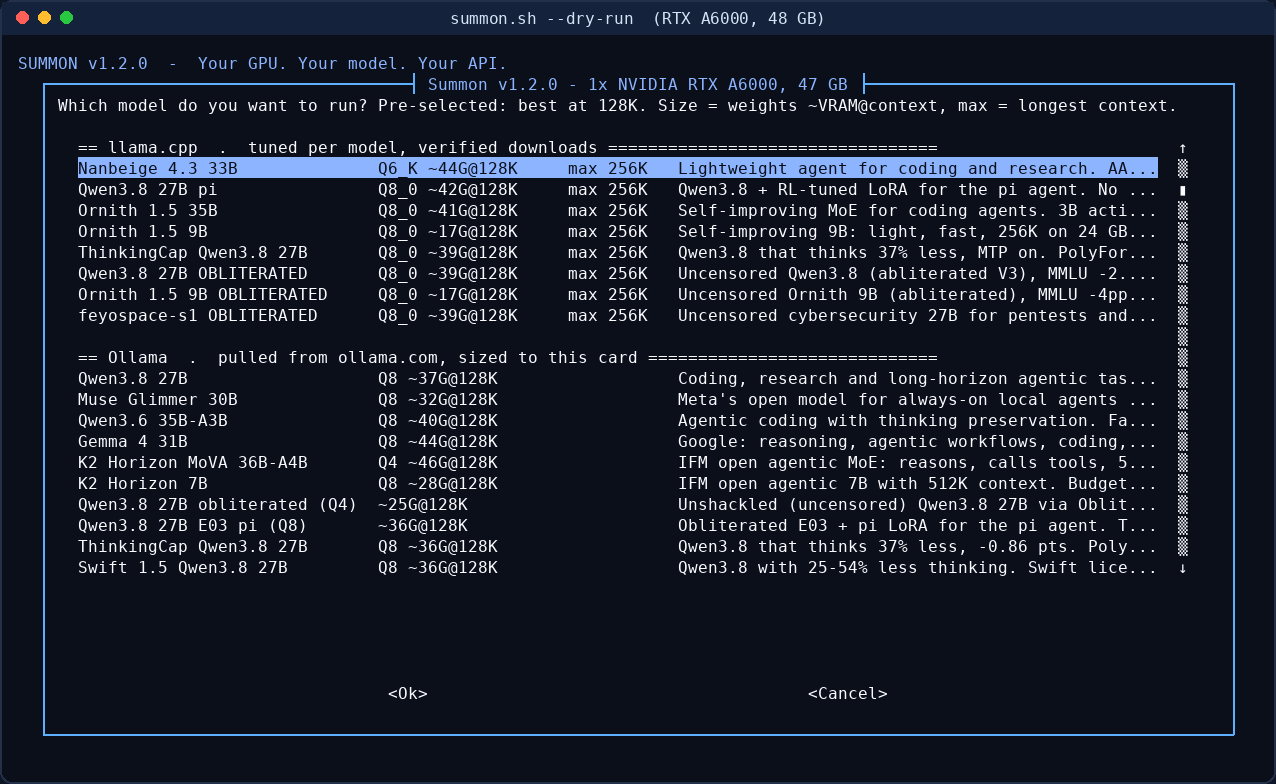
The best model that reaches 128K context on your card is pre-selected. Context first, then the most precise weights that still fit.
Verifies
Resumable downloads, exact byte counts, GGUF header checks, sha256 on request. Every layer stays on the GPU or it fails loudly.
Stays private
An API key, generated once and kept across reruns. On your own PC it only listens on 127.0.0.1. On a rented pod, add TUNNEL=1 for a free HTTPS URL. No VPN needed.
Tuned per model
The model's own chat template, native tool calls, a host-RAM prompt cache, and speculative decoding with each model's draft: MTP heads, a 3B draft model, n-gram drafts.
Proves it works
Before handing you the URL, it makes a real tool call and checks it comes back in OpenAI format.
Connects your tools
Prints a browser chat page plus ready-to-paste setup for Hermes Agent, pi, opencode, OpenClaw and Cursor, with your URL and key filled in.
03 Models
| Model | Engine | Good at | 24 GB (RTX 3090 / 4090) | 48 GB (RTX A6000) |
|---|---|---|---|---|
| Nanbeige 4.3 33B | llama.cpp | Agentic coding. Top of the ≤40B class on Artificial Analysis (index 20). | up to 48K | 128K (Q6_K) · 256K (Q3_K_M) |
| Qwen3.8 27B pi | llama.cpp | Qwen3.8 27B plus a LoRA trained with RL to drive the pi coding agent. Thinking off, far fewer tokens. Vendor benchmarks only. | ~48K (Q4_K_M) | 256K with 8-bit weights |
| Ornith 1.5 35B | llama.cpp | Fast MoE, ~3B active per token. Vendor benchmarks only. | 128K, experts in RAM | 256K with 8-bit weights |
| Ornith 1.5 9B | llama.cpp | Fast and light. Vendor benchmarks only. | 256K with 8-bit weights | 256K with 8-bit weights |
| ThinkingCap Qwen3.8 27B | llama.cpp | Qwen3.8 27B that thinks ~37% less, with its built-in MTP head for faster decoding. PolyForm Small Business licence. | 128K (IQ4_XS) | 128K with 8-bit weights |
| Ternary Bonsai 2 27B | llama.cpp | Qwen3.8 27B in ternary weights: 7.6 GB, 98% of FP16 across 14 benchmarks (vendor). Runs on 16 GB cards at 128K. | 256K (q8_0 cache) | 256K (f16 cache) |
| Qwen3.8 27B OBLITERATED | llama.cpp | Uncensored Qwen3.8 (OBLITERATUS abliteration, vendor MMLU -2.1pp). Thinking off; served with Qwen3.8's own template so tool calls work. | 128K (Q4_K_M) | 256K with 8-bit weights |
| Ornith 1.5 9B OBLITERATED | llama.cpp | Uncensored Ornith 9B (vendor MMLU -4pp). Thinking off. | 256K with 8-bit weights | 256K with 8-bit weights |
| feyospace-s1 OBLITERATED | llama.cpp | Uncensored ~28B tuned for cybersecurity: pentests, CTFs, vulnerability research. Run its tools in a sandbox. | 128K (Q4_K_M) | 256K with 8-bit weights |
| DeepSeek V4.1 Flash OBLITERATED | llama.cpp | Uncensored 748B MoE (refusals reduced, not removed; MMLU 83.6%). 237 GB download. Needs a 96 GB card + ~130 GB free RAM, or ~160 GB of VRAM across cards. | not offered | not offered |
| Ollama models | Ollama | Qwen3.8 27B, Qwen3.6 35B-A3B, Gemma 4 31B, K2 Horizon, Muse Glimmer… | Qwen3.8 27B at 64K | most at 128K, 8-bit |
All of them are in one menu, sized live to your card. Every model serves an OpenAI-compatible API: Summon prints the URL, key and client setup when it's done. One engine runs at a time; starting one stops the other.
04 What should I rent?
| GPU (VRAM) | Lium price per hour | What Summon runs on it |
|---|---|---|
| RTX 4060 Ti / 5060 Ti / 5070 Ti (16 GB) | $0.12–0.30 | Ternary Bonsai 2 27B at 128K, the only 27B that fits. Cheapest way to run a 27B. 12 GB cards are not offered. |
| RTX 3090 / 4090 (24 GB) | $0.15–0.64 (3090) $0.35–0.55 (4090) | Ornith 1.5 9B at 128K, 8-bit (pre-selected). Ternary Bonsai 2 27B at 256K. ThinkingCap 27B or Qwen3.8 27B at 128K, 4-bit. Ornith 35B with experts in RAM. Good for trying it out and light agents. |
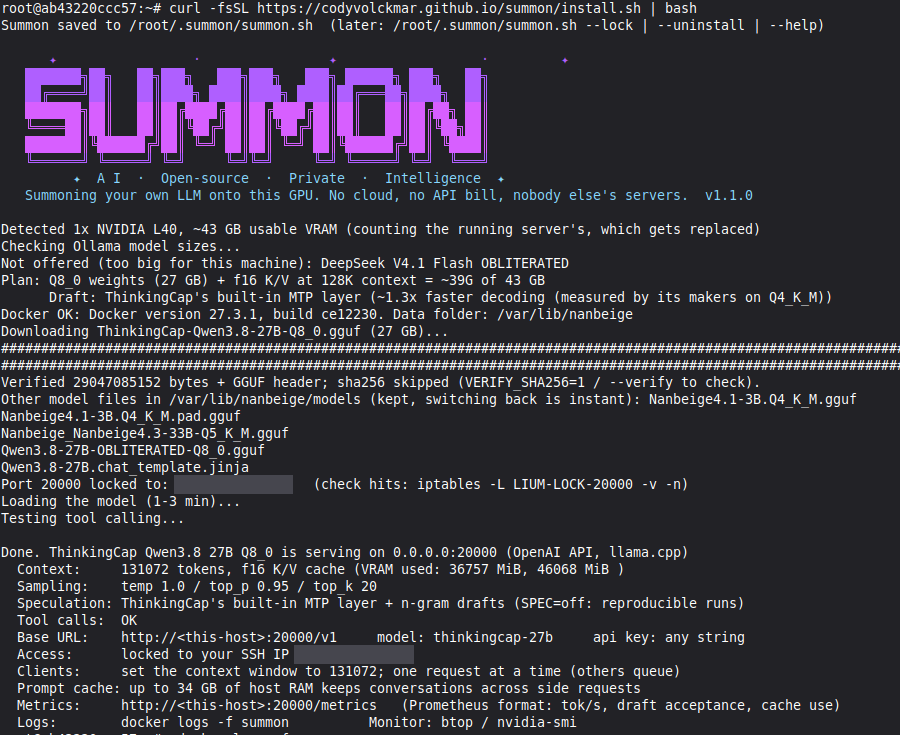
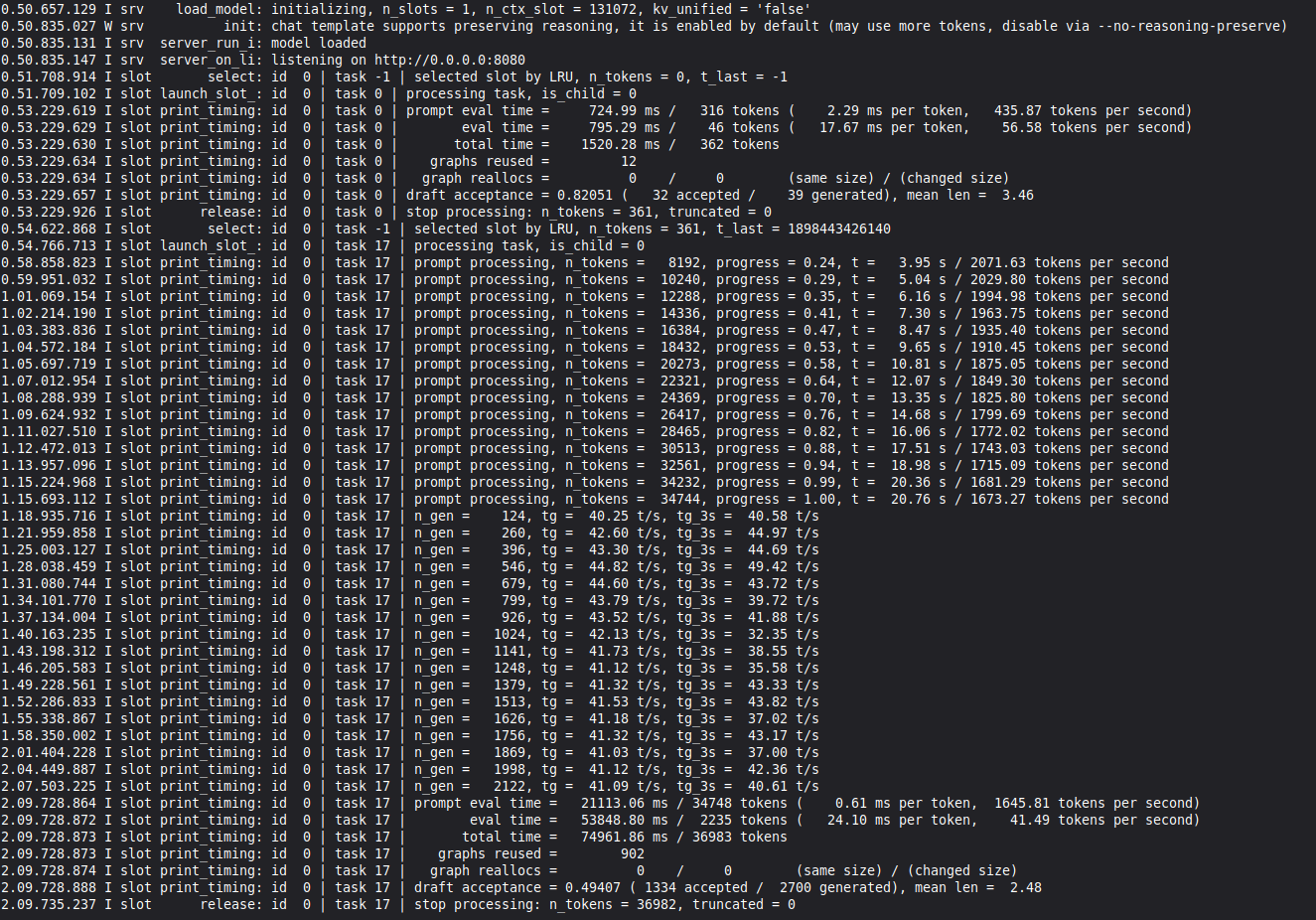
| L40 / L40S / RTX A6000 (48 GB) | $0.33 (L40) $0.38 (L40S) $0.42–0.67 (A6000) | Best value. Nanbeige 33B at 128K, 6-bit (pre-selected). ThinkingCap, Qwen3.8 and Ornith 35B at 128K, 8-bit. Measured: ~42 tok/s with ThinkingCap on an L40. |
| RTX PRO 6000 Blackwell (96 GB) | $1.60–1.99 | Every 27–35B model at 256K, 8-bit; Nanbeige up to 384K at 8-bit (512K at 3-bit). DeepSeek V4.1 Flash 748B too, if the pod has ~130 GB free RAM (experts in system RAM). |
Start with a 48 GB card: it runs every 27–35B model at 128K with near-full precision, for about the price of a 24 GB card. Prices are Lium's live asks per GPU on 2026-11-20 and change with supply.
Check any card before renting: SUMMON_GPU="L40:46068" ./summon.sh --dry-run.
05 See it first
First, a real install on an NVIDIA L40. After that, real screens from ./summon.sh --dry-run: the actual script and whiptail menus, nothing installed.
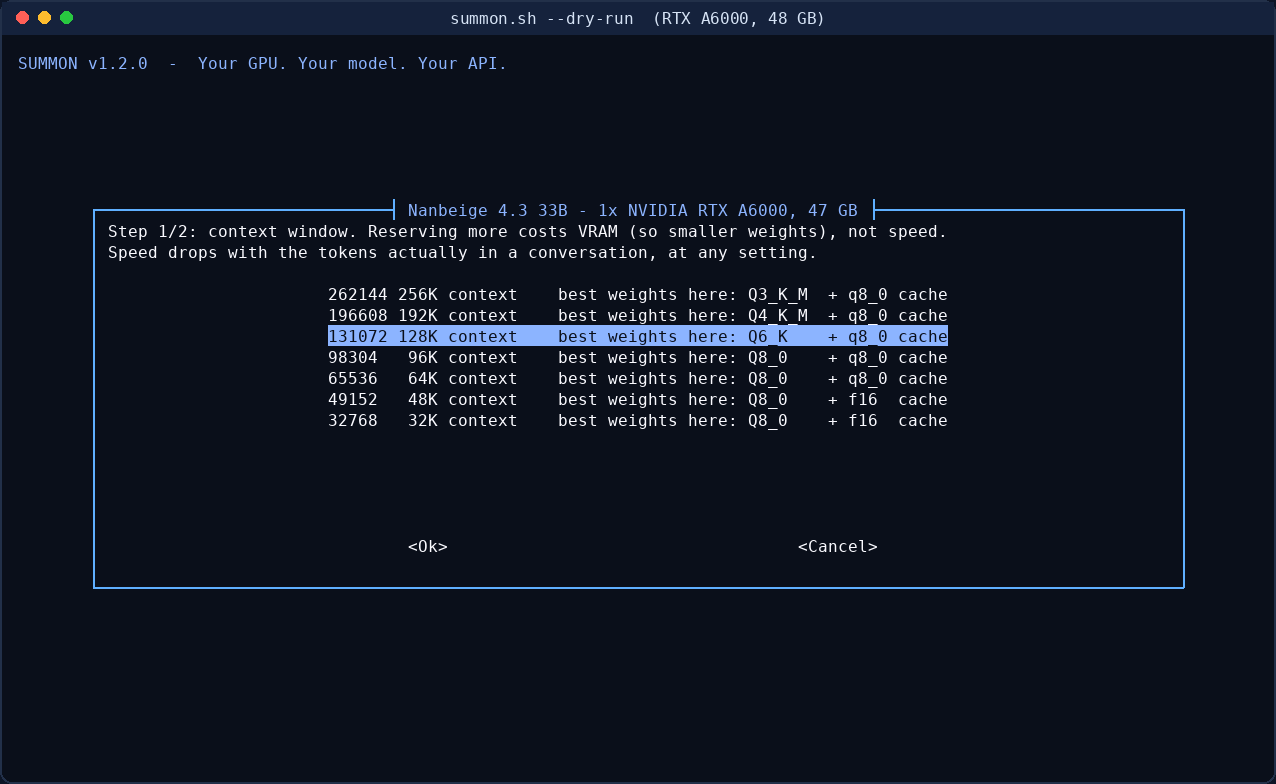
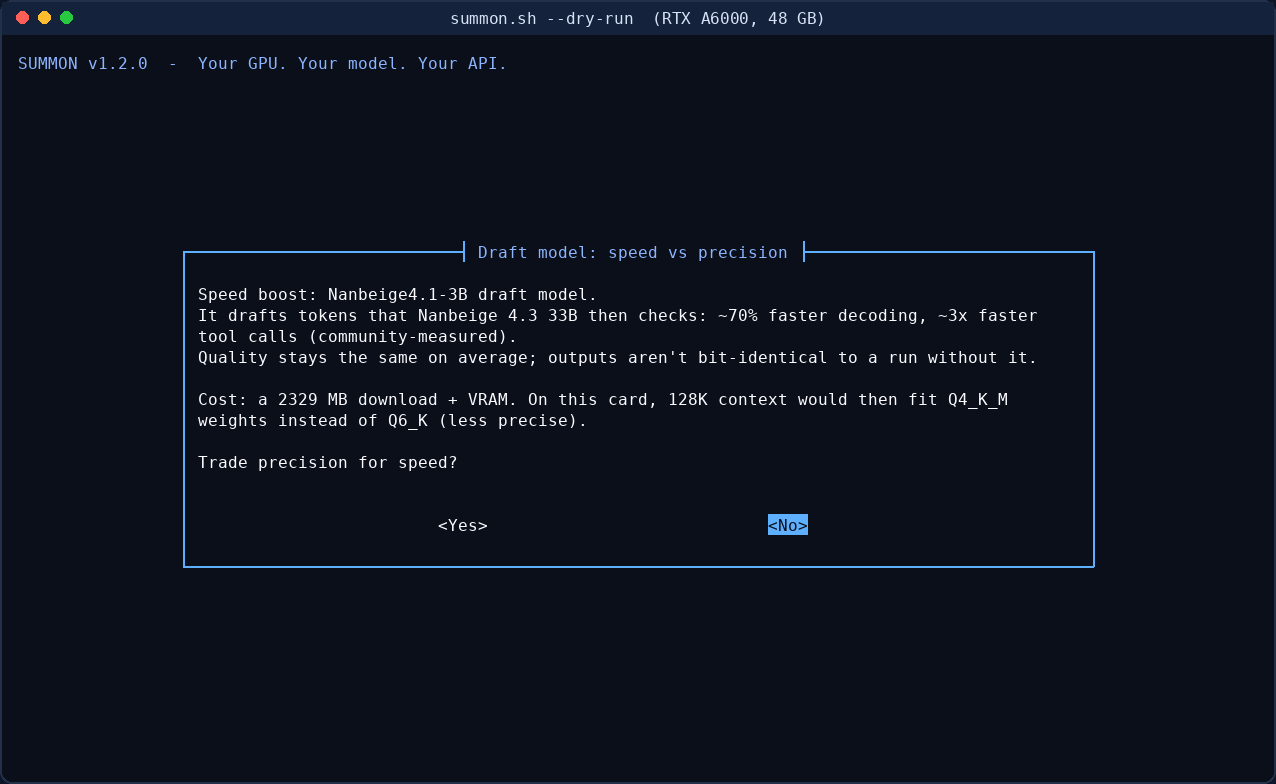
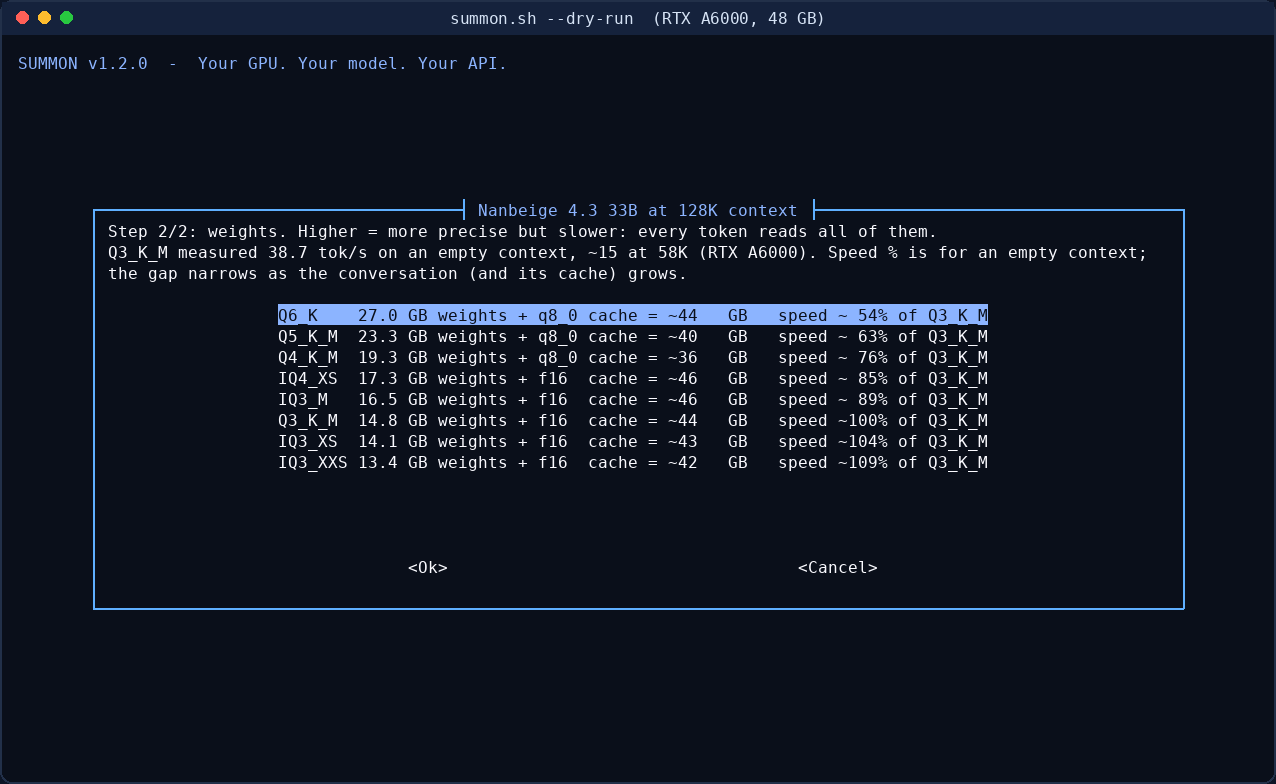
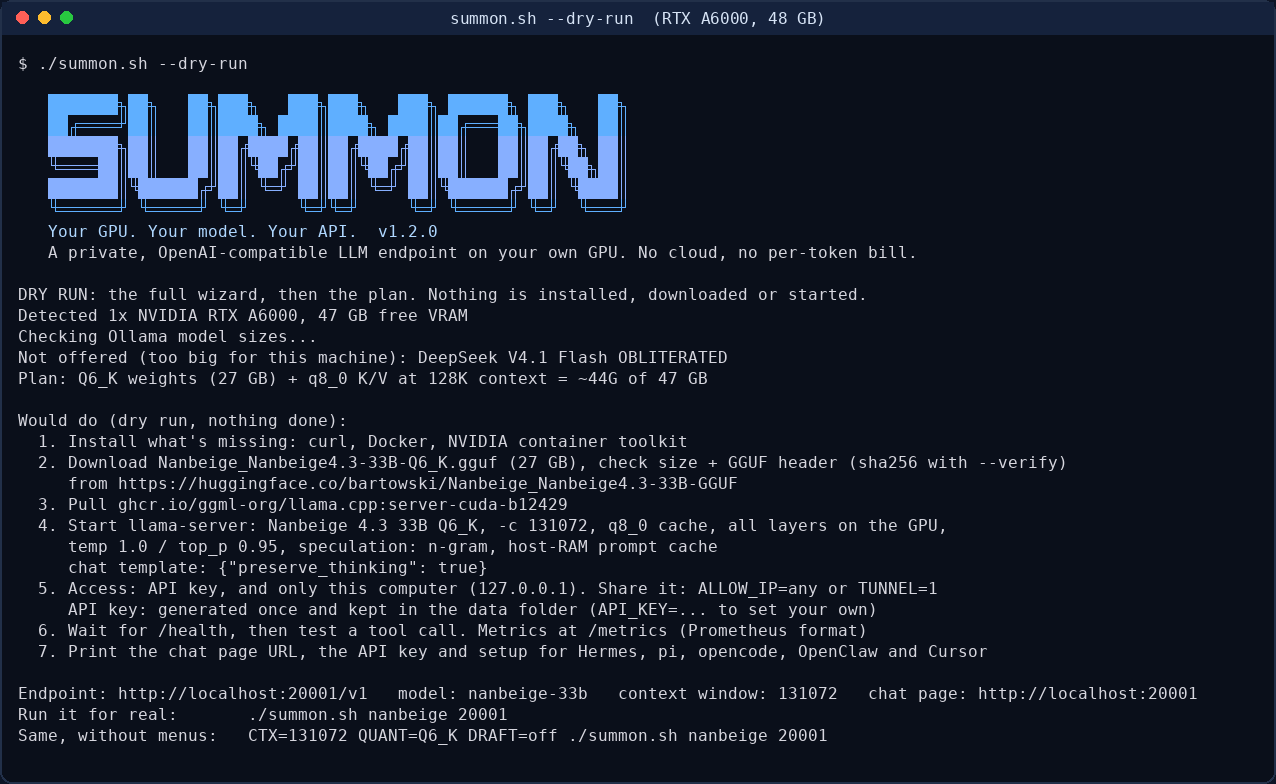
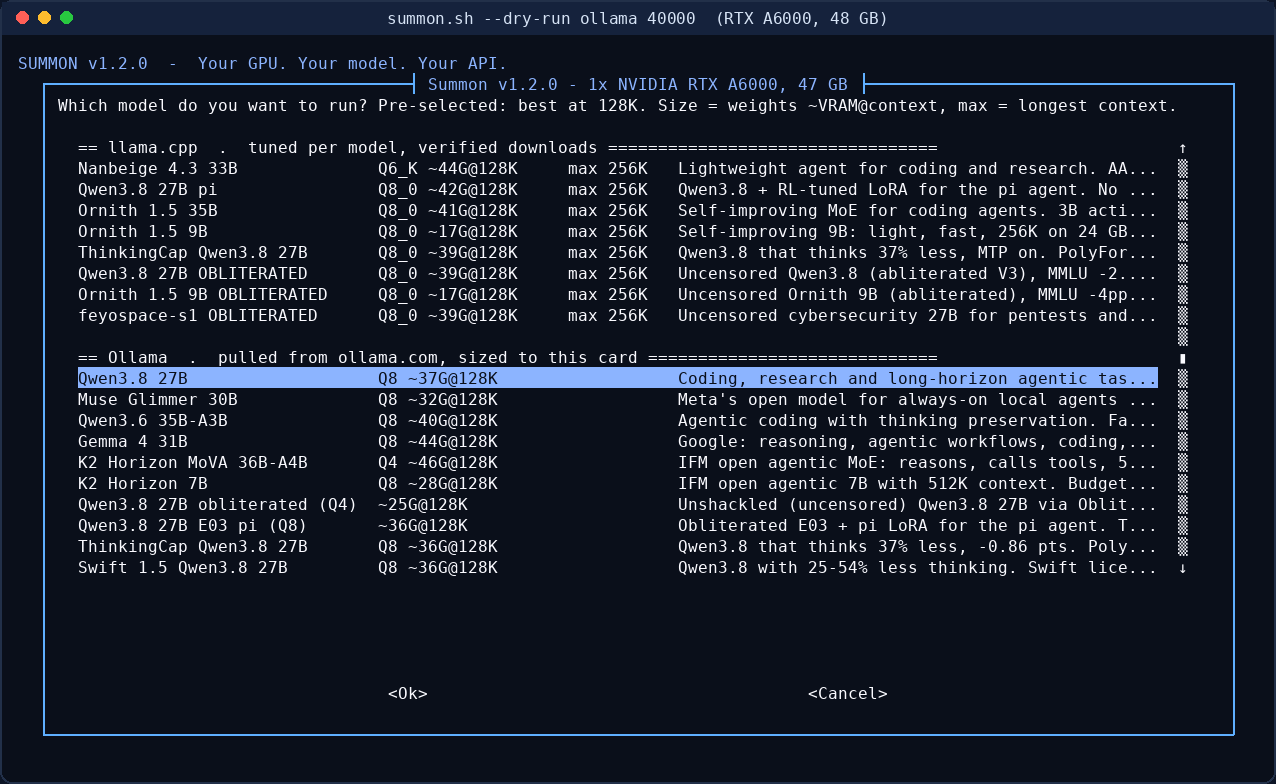
./summon.sh ollama: the same menu, Qwen3.8 27B pre-selected (ranked with independent benchmarks).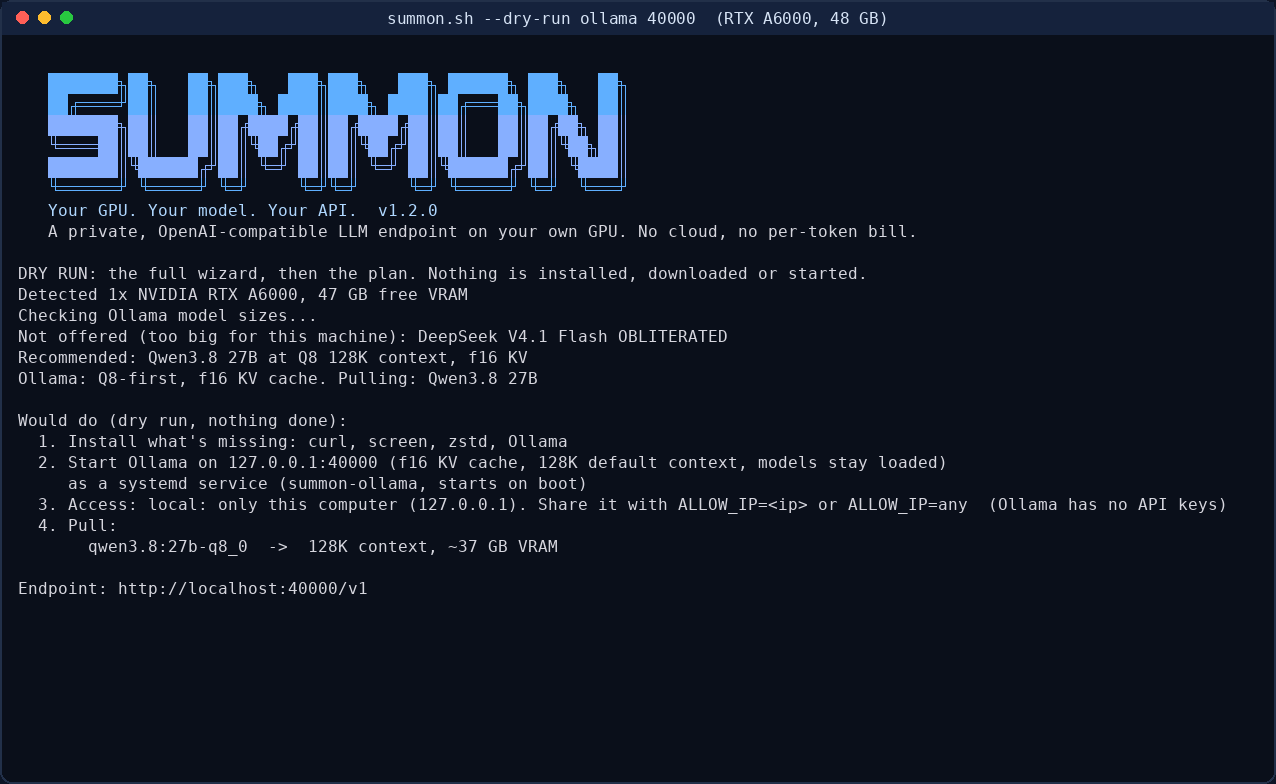
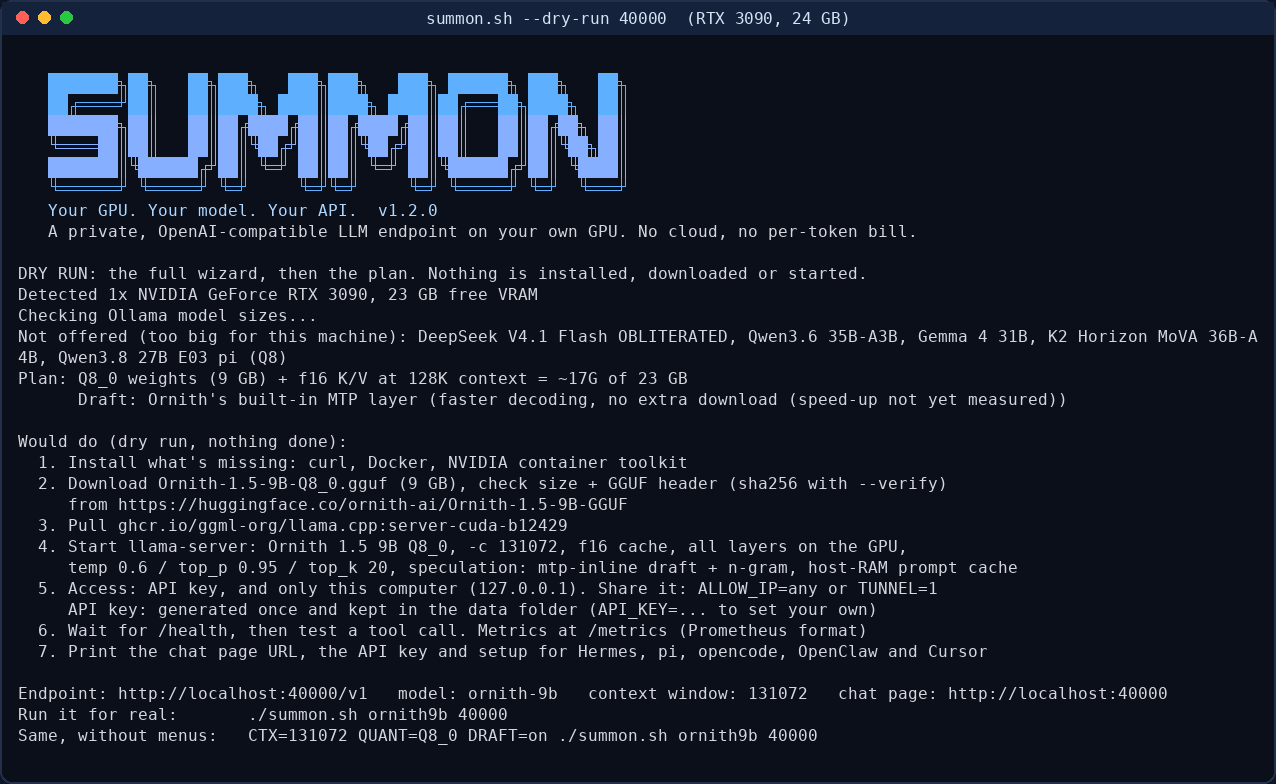
06 After install
- Open the chat page it prints in your browser (paste the API key once), or copy the setup it prints for Hermes Agent, pi, opencode, OpenClaw or Cursor. See it again any time:
~/.summon/summon.sh --connect. - Cursor, phones, or a pod behind a proxy: rerun with
TUNNEL=1for a free HTTPS URL (Cloudflare quick tunnel). - Switch models or weights any time: run
~/.summon/summon.shagain. - New key:
~/.summon/summon.sh --new-key. Firewall on top of the key:ALLOW_IP=203.0.113.7 ~/.summon/summon.sh. - Remove everything:
~/.summon/summon.sh --uninstall. All options:--help.
07 What you need
GPU
NVIDIA with 24 GB+ for the long-context models (RTX 3090 / 4090 / A6000 / 6000 Ada). 48 GB unlocks Nanbeige at 128–256K.
Linux
Ubuntu or Debian (apt), NVIDIA driver installed, root or sudo. Summon installs Docker and the NVIDIA container toolkit if missing.
Windows
Windows 10 21H2+ or 11 with a current NVIDIA driver. The PowerShell installer sets up WSL 2 + Ubuntu and runs Summon there.
Honest notes: Summon is young. Its Nanbeige llama.cpp setup has served real agent work on rented RTX A6000 pods, and ThinkingCap 27B ran end to end on an L40 (~42 tok/s, tool calls OK); the full wizard, the Windows/WSL path and the Ornith models have only been tested with dry runs and simulated GPUs so far. Ornith's benchmarks are the vendor's own. Downloads are 2–38 GB (DeepSeek V4.1 Flash: 237 GB). Piping a script into your shell gives it root: read it first if that matters to you (it should).
08 Questions?
Cody Volckmar
Summon is a free, open-source side project, not a service. Questions, bugs and ideas: GitHub issues. Want to build on it together? Say hi: cody.volckmar@gmail.com or x.com/Chillisock7 on X.